CodeDeck Industrial Toolkit: Android toolkit for warehouse and logistics
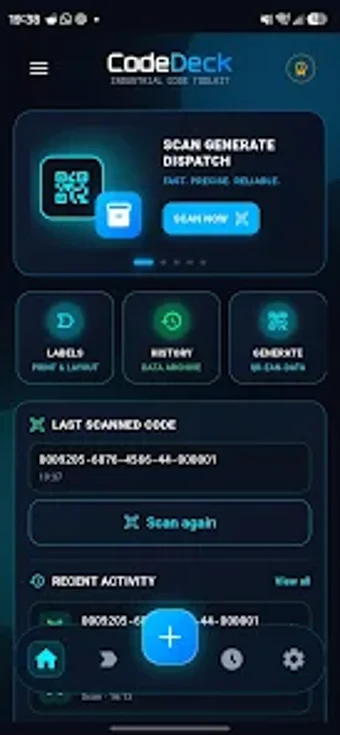
Scan labels, read and write NFC tags, generate barcodes, and export printable PDFs from a single mobile app that works without connectivity, all on an Android device. CodeDeck: Industrial Toolkit, from MuGenesis, packages scanning, labeling, NFC, and an industrial calculator into one business-productivity app. Key capabilities include an offline-first scanner, glove-friendly high-contrast UI, multi-code support, and batch tracking. It fits warehouse, logistics, and field technicians who need local, privacy-focused tools for on-site data capture and labeling.
How does it serve on-site data capture and label workflows?
CodeDeck centers on capture and output for physical workflows: the app includes a document and label scanner with direct PDF export and printing, an image-to-label converter, and a multi-code scanner and generator supporting Data Matrix, QR, and standard barcodes. Those capabilities let an operator convert photos or scans into editable labels and produce PDF outputs without leaving the device, matching packing and shipping tasks that require immediate, local print-ready files.
What can teams do with its tracking and calculation tools?
The app provides Batch and Lot Tracking with customizable industrial profiles and DeckCalc, an industrial calculator integrated into other features. Use the tracking profiles to tag batches and attach scanned codes to lots, then run calculations inside the same session. This keeps quantity adjustments, simple unit conversions, and batch identifiers in one workflow rather than moving between separate apps on the device.
Is the interface suited to industrial environments and non-technical users?
CodeDeck uses a high-contrast UI and a glove mode engineered for visibility and touch with protective gear, which targets warehouse and field conditions. The app stores scan history, labels, and NFC records locally with zero telemetry, a privacy-focused choice that reduces onboarding steps tied to accounts. Templates and industrial profiles reduce configuration work for technicians familiar with packing and labeling routines.
How does it handle device compatibility and offline operation?
Available on Android and also on iOS, the app ships as an offline-first toolkit: every listed feature, including scanning, NFC tasks, and PDF export, functions without an internet connection and without a mandatory cloud account. That design removes dependency on network availability during shifts, while the NFC toolkit supports reading, writing, protecting, and repairing NDEF records on compatible hardware.
Clear choice for on-site operators who must keep data local
CodeDeck suits warehouse and logistics professionals who need an offline, privacy-centered set of capture and labeling tools on mobile hardware. The app consolidates several industrial tasks onto a single device, reducing the need to carry multiple point solutions. Teams that require server-synced databases or cloud collaboration should expect a deliberate trade-off: CodeDeck prioritizes local control over cloud workflows.